🔹 1. SIM Verification Status Online Check (PTA System)
Yeh method sab se fast aur official tareeqa hai.
Official PTA Link:
👉 https://cnic.sims.pk
Steps:
-
Website open karein
-
CNIC number enter karein
-
“I’m not a robot” verify karein
-
Submit par click karein
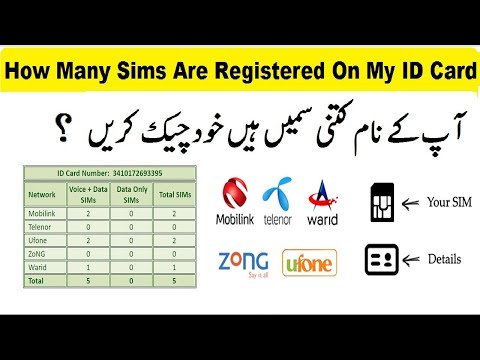
Aap ke CNIC par registered tamam SIMs network-wise show ho jayengi:
-
Jazz
-
Zong
-
Ufone
-
Telenor
-
SCO
Is list me har SIM ka status verified / active bhi mentioned hota hai.
🔹 2. SIM Verification Status via SMS (Offline Method)
Agar aap ke pass internet nahi hai, tab bhi aap SIM verification check kar sakte hain.
Type karein:CNIC Number (without dashes)
Send to:668
Example:3520187654321 → Send to 668
Aap ko SMS reply me pata chal jayega:
-
CNIC par kitni SIMs hain
-
Kaun si network ki SIM active hai
(Charges apply — usually Rs. 1 + tax)
🔹 3. Verify SIM Biometric Status (BVS Center)
Agar aap ki SIM verification pending ho:
-
Kis bhi franchise / retailer par chale jayein
-
Apna CNIC aur SIM le kar
-
Biometric scan karwana hoga
-
1–2 minutes me SIM verified ho jati hai
🔹 4. Why SIM Verification is Important?
✔ Fraud aur illegal activities se bachne ke liye
✔ PTA aur FIA ke rules follow karne ke liye
✔ SIM band hone se bachne ke liye
✔ Bank OTP aur wallet services use karne ke liye
🔹 5. How Many SIMs Can Be Registered on One CNIC?
PTA rules ke mutabiq:
-
Per network → 3 SIMs
-
Total across all networks → 15 SIM cards
Agar limit full ho jaye to purani SIMs block karwana parta hai.
⭐ Extra Tips
-
Agar aap ko koi unknown SIM apne CNIC par dikhe to foran PTA complaint karain.
-
Hamesha original CNIC use karein — photocopy par kabhi SIM na lagwain.
-
Agar SIM non-verified ho to bank apps aur JazzCash/EasyPaisa login issue de sakte hain.

.jpg)
.jpg)